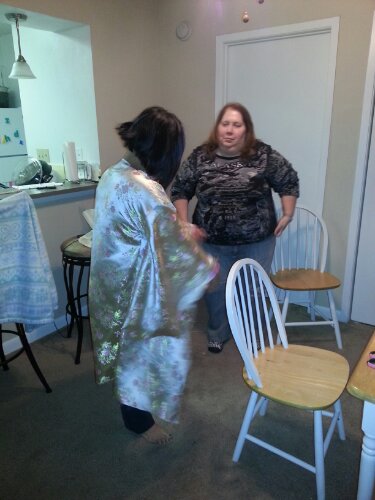
Try it on, Abi!

Try it on, Abi!

Abi sews with the $400 machine she got for $179 on ebay while Janeil pins the next section…

Over the past few days, I’ve puzzled over how to portray the actions of two characters who live on Mars — Shadowgrass and Voodoo Billie — who’ve fallen in love with each other, both for the first time.
I’ve felt how confused they are, how their regularly scheduled lives have been interrupted.
I need space in my thoughts to separate myself from them so I can look at their situation from a bird’s-eye view for a while.
Yet, tomorrow the University of Tennessee plays the University of Alabama in a classic fall battle between traditional powers, the house that Neyland’s built versus the house that Bear Bryant built.
Two words: Go Vols! We true fans are behind you all the way!!!!
Although Dobyns-Bennett was my rival high school when I was a teenager, a worthy project I supported nonetheless:
I guess what I’m saying is wouldn’t be cool if people walking by our house could scan a QR code which took them to a place where they could either download an app and control the yard art sculpture via preprogrammed buttons or have the ability to program the yard art sculpture using visual tools?
For now, simply getting the first version programmed and built is a much bigger challenge!
So, as I muddle through the design in my thoughts, I figure that the yard art sculpture needs both physical animation — moving an appendage of some sort with a thingamabob called a servo — and virtual animation — moving “eyes” and “eyebrows” with LED matrix/matrices.
The brain of the sculpture is an Arduino microcontroller.
I don’t have my cameraphone handy (too lazy to walk 100 feet to the other end of the house to get it) so suffice it to say I’ve combined two circuits, this one with eight LEDs:
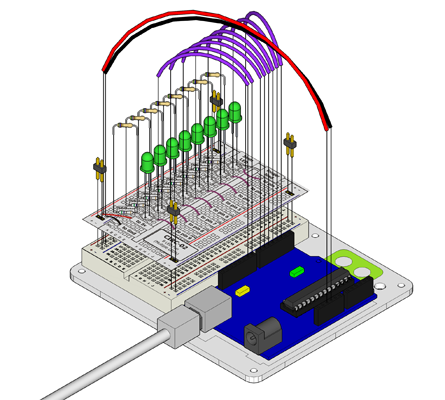

Right now, the servo rotates counterclockwise/clockwise and then the LEDs light from middle pair to outer pair and back, essentially as if the sculpture blinked its eyes and then waved an appendage.
Here’s the Arduino code I used (contains all example code for switching the “eyes” and “eyebrows” later on):
/*     ---------------------------------------------------------
 *     |  Arduino Experimentation Kit Example Code             |
 *     |  CIRC-02 .: 8 LED Fun      :. (Multiple LEDs)         |
 *     |  CIRC-04 .: A Single servo :. revolving servo         |
 *     ---------------------------------------------------------
 *  Combining two sample code sets
 *  Number One:
 *  A few Simple LED animations
 *
 * For more information on this circuit, go to http://tinyurl.com/d2hrud
 *
 */

// Number Two: Sweep
// by BARRAGAN
// For more information on this circuit, go to http://www.oomlout.com/oom.php/products/ardx/circ-04

#include

Servo myservo;  // create servo object to control a servo
                // a maximum of eight servo objects can be created

int pos = 0;    // variable to store the servo position

//LED Pin Variables
int ledPins[] = {2,3,4,5,6,7,8,9}; //An array to hold the pin each LED is connected to
                                   //i.e. LED #0 is connected to pin 2, LED #1, 3 and so on
                                   //to address an array use ledPins[0] this would equal 2
                                   //and ledPins[7] would equal 9

/*
 * setup() - this function runs once when you turn your Arduino on
 * We the three control pins to outputs
 */
void setup()
{
  myservo.attach(10);  // attaches the servo on pin 10 to the servo object

  //Set each pin connected to an LED to output mode (pulling high (on) or low (off)
  for(int i = 0; i < 8; i++){         //this is a loop and will repeat eight times
      pinMode(ledPins[i],OUTPUT); //we use this to set each LED pin to output
  }                                   //the code this replaces is below

  /* (commented code will not run)
   * these are the lines replaced by the for loop above they do exactly the
   * same thing the one above just uses less typing
  pinMode(ledPins[0],OUTPUT);
  pinMode(ledPins[1],OUTPUT);
  pinMode(ledPins[2],OUTPUT);
  pinMode(ledPins[3],OUTPUT);
  pinMode(ledPins[4],OUTPUT);
  pinMode(ledPins[5],OUTPUT);
  pinMode(ledPins[6],OUTPUT);
  pinMode(ledPins[7],OUTPUT);
  (end of commented code)*/
}

/*
 * loop() - this function will start after setup finishes and then repeat
 * we call a function called oneAfterAnother(). if you would like a different behaviour
 * uncomment (delete the two slashes) one of the other lines
 */
void loop()                     // run over and over again
{
  //oneAfterAnotherNoLoop();   //this will turn on each LED one by one then turn each off
  //oneAfterAnotherLoop();   //does the same as oneAfterAnotherNoLoop but with
                             //much less typing
  //oneOnAtATime();          //this will turn one LED on then turn the next one
                             //on turning the
                             //former off (one LED will look like it is scrolling
                             //along the line
  inAndOut();              //lights the two middle LEDs then moves them out then back
                             //in again
}

/*
 * oneAfterAnotherNoLoop() - Will light one LED then delay for delayTime then light
 * the next LED until all LEDs are on it will then turn them off one after another
 *
 * this does it without using a loop which makes for a lot of typing.
 * oneOnAtATimeLoop() does exactly the same thing with less typing
 */
void oneAfterAnotherNoLoop(){
  int delayTime = 100; //the time (in milliseconds) to pause between LEDs
                       //make smaller for quicker switching and larger for slower
  digitalWrite(ledPins[0], HIGH);  //Turns on LED #0 (connected to pin 2 )
  delay(delayTime);                //waits delayTime milliseconds
  digitalWrite(ledPins[1], HIGH);  //Turns on LED #1 (connected to pin 3 )
  delay(delayTime);                //waits delayTime milliseconds
  digitalWrite(ledPins[2], HIGH);  //Turns on LED #2 (connected to pin 4 )
  delay(delayTime);                //waits delayTime milliseconds
  digitalWrite(ledPins[3], HIGH);  //Turns on LED #3 (connected to pin 5 )
  delay(delayTime);                //waits delayTime milliseconds
  digitalWrite(ledPins[4], HIGH);  //Turns on LED #4 (connected to pin 6 )
  delay(delayTime);                //waits delayTime milliseconds
  digitalWrite(ledPins[5], HIGH);  //Turns on LED #5 (connected to pin 7 )
  delay(delayTime);                //waits delayTime milliseconds
  digitalWrite(ledPins[6], HIGH);  //Turns on LED #6 (connected to pin 8 )
  delay(delayTime);                //waits delayTime milliseconds
  digitalWrite(ledPins[7], HIGH);  //Turns on LED #7 (connected to pin 9 )
  delay(delayTime);                //waits delayTime milliseconds

//Turns Each LED Off
  digitalWrite(ledPins[7], LOW);  //Turns on LED #0 (connected to pin 2 )
  delay(delayTime);                //waits delayTime milliseconds
  digitalWrite(ledPins[6], LOW);  //Turns on LED #1 (connected to pin 3 )
  delay(delayTime);                //waits delayTime milliseconds
  digitalWrite(ledPins[5], LOW);  //Turns on LED #2 (connected to pin 4 )
  delay(delayTime);                //waits delayTime milliseconds
  digitalWrite(ledPins[4], LOW);  //Turns on LED #3 (connected to pin 5 )
  delay(delayTime);                //waits delayTime milliseconds
  digitalWrite(ledPins[3], LOW);  //Turns on LED #4 (connected to pin 6 )
  delay(delayTime);                //waits delayTime milliseconds
  digitalWrite(ledPins[2], LOW);  //Turns on LED #5 (connected to pin 7 )
  delay(delayTime);                //waits delayTime milliseconds
  digitalWrite(ledPins[1], LOW);  //Turns on LED #6 (connected to pin 8 )
  delay(delayTime);                //waits delayTime milliseconds
  digitalWrite(ledPins[0], LOW);  //Turns on LED #7 (connected to pin 9 )
  delay(delayTime);                //waits delayTime milliseconds
}

/*
 * oneAfterAnotherLoop() - Will light one LED then delay for delayTime then light
 * the next LED until all LEDs are on it will then turn them off one after another
 *
 * this does it using a loop which makes for a lot less typing.
 * than oneOnAtATimeNoLoop() does exactly the same thing with less typing
 */
void oneAfterAnotherLoop(){
  int delayTime = 100; //the time (in milliseconds) to pause between LEDs
                       //make smaller for quicker switching and larger for slower

//Turn Each LED on one after another
  for(int i = 0; i <= 7; i++){
    digitalWrite(ledPins[i], HIGH);  //Turns on LED #i each time this runs i
    delay(delayTime);                //gets one added to it so this will repeat
  }                                  //8 times the first time i will = 0 the final
                                     //time i will equal 7;

//Turn Each LED off one after another
  for(int i = 7; i >= 0; i--){  //same as above but rather than starting at 0 and counting up
                                //we start at seven and count down
    digitalWrite(ledPins[i], LOW);  //Turns off LED #i each time this runs i
    delay(delayTime);                //gets one subtracted from it so this will repeat
  }                                  //8 times the first time i will = 7 the final
                                     //time it will equal 0

}

/*
 * oneOnAtATime() - Will light one LED then the next turning off all the others
 */
void oneOnAtATime(){
  int delayTime = 100; //the time (in milliseconds) to pause between LEDs
                       //make smaller for quicker switching and larger for slower

  for(int i = 0; i <= 7; i++){
    int offLED = i - 1;  //Calculate which LED was turned on last time through
    if(i == 0) {         //for i = 1 to 7 this is i minus 1 (i.e. if i = 2 we will
      offLED = 7;        //turn on LED 2 and off LED 1)
    }                    //however if i = 0 we don't want to turn of led -1 (doesn't exist)
                         //instead we turn off LED 7, (looping around)
    digitalWrite(ledPins[i], HIGH);     //turn on LED #i
    digitalWrite(ledPins[offLED], LOW); //turn off the LED we turned on last time
    delay(delayTime);
  }
}

/*
 * inAndOut() - This will turn on the two middle LEDs then the next two out
 * making an in and out look
 */
void inAndOut(){
  int delayTime = 100; //the time (in milliseconds) to pause between LEDs
                       //make smaller for quicker switching and larger for slower

  //runs the LEDs out from the middle
  for(int i = 0; i <= 3; i++){
    int offLED = i - 1;  //Calculate which LED was turned on last time through
    if(i == 0) {         //for i = 1 to 7 this is i minus 1 (i.e. if i = 2 we will
      offLED = 3;        //turn on LED 2 and off LED 1)
    }                    //however if i = 0 we don't want to turn of led -1 (doesn't exist)
                         //instead we turn off LED 7, (looping around)
    int onLED1 = 3 - i;       //this is the first LED to go on ie. LED #3 when i = 0 and LED
                             //#0 when i = 3
    int onLED2 = 4 + i;       //this is the first LED to go on ie. LED #4 when i = 0 and LED
                             //#7 when i = 3
    int offLED1 = 3 - offLED; //turns off the LED we turned on last time
    int offLED2 = 4 + offLED; //turns off the LED we turned on last time

    digitalWrite(ledPins[onLED1], HIGH);
    digitalWrite(ledPins[onLED2], HIGH);
    digitalWrite(ledPins[offLED1], LOW);
    digitalWrite(ledPins[offLED2], LOW);
    delay(delayTime);
  }

  //runs the LEDs into the middle
  for(int i = 3; i >= 0; i--){
    int offLED = i + 1;  //Calculate which LED was turned on last time through
    if(i == 3) {         //for i = 1 to 7 this is i minus 1 (i.e. if i = 2 we will
      offLED = 0;        //turn on LED 2 and off LED 1)
    }                    //however if i = 0 we don't want to turn of led -1 (doesn't exist)
                         //instead we turn off LED 7, (looping around)
    int onLED1 = 3 - i;       //this is the first LED to go on ie. LED #3 when i = 0 and LED
                             //#0 when i = 3
    int onLED2 = 4 + i;       //this is the first LED to go on ie. LED #4 when i = 0 and LED
                             //#7 when i = 3
    int offLED1 = 3 - offLED; //turns off the LED we turned on last time
    int offLED2 = 4 + offLED; //turns off the LED we turned on last time

    digitalWrite(ledPins[onLED1], HIGH);
    digitalWrite(ledPins[onLED2], HIGH);
    digitalWrite(ledPins[offLED1], LOW);
    digitalWrite(ledPins[offLED2], LOW);
    delay(delayTime);
  }
  for(pos = 0; pos < 180; pos += 1)  // goes from 0 degrees to 180 degrees
  {                                  // in steps of 1 degree
    myservo.write(pos);              // tell servo to go to position in variable 'pos'
    delay(15);                       // waits 15ms for the servo to reach the position
  }
  for(pos = 180; pos>=1; pos-=1)     // goes from 180 degrees to 0 degrees
  {
    myservo.write(pos);              // tell servo to go to position in variable 'pos'
    delay(15);                       // waits 15ms for the servo to reach the position
  }
}
In French:
Déshabillez-moi, déshabillez-moi
Oui, mais pas tout de suite, pas trop vite
Sachez me convoiter, me désirer, me captiver
Déshabillez-moi, déshabillez-moi
Mais ne soyez pas comme, tous les hommes, trop pressés.
Et d’abord, le regard
Tout le temps du prélude
Ne doit pas être rude, ni hagard
Dévorez-moi des yeux
Mais avec retenue
Pour que je m’habitue, peu à peu…
Déshabillez-moi, déshabillez-moi
Oui, mais pas tout de suite, pas trop vite
Sachez m’hypnotiser, m’envelopper, me capturer
Déshabillez-moi, déshabillez-moi
Avec délicatesse, en souplesse, et doigté
Choisissez bien les mots
Dirigez bien vos gestes
Ni trop lents, ni trop lestes, sur ma peau
Voilà ça y’est, je suis
Frémissante et offerte
De votre main experte, allez-y…
Déshabillez-moi, déshabillez-moi
Maintenant tout de suite, allez vite
Sachez me posséder, me consommer, me consumer
Déshabillez-moi, déshabillez-moi
Conduisez-vous en homme
Soyez l’homme… Agissez !
Déshabillez-moi, déshabillez-moi
Et vous… déshabillez-vous !
= = = = =
Undress me, undress me
Yes, but not immediately, not too fast
knowing how lust me, desire me, captivate me
Undress me, undress me
But do not be like all men, too rushed.
And first the gaze
All the time of prelude
Should not be rude or haggard
Devour me eyes
But with restraint
For that I used to, little by little…
Undress me, undress me
Yes, but not immediately, not too fast
knowing how hypnotize me, wrap me, hunt me
Undress me, undress me
With delicacy, flexibility and fingering
Carefully choose words
Point well your gestures
Neither too slow nor too nimble on my skin
Here that’s it, I’m
Quivering and offered
Of your expert hand, go there…
Undress me, undress me
Behave like a man
Be the man… take action !
Undress me, undress me
And you… undress you too !
In French:
Parlez moi d’amour
Redites-moi des choses tenders
Votre beau discours
Mon coeur n’est pas las de l’entendre
Pourvu que toujours
Vous repetiez ces mots supremes
Je vous aime
Vous savez bien
Que dans le fond je n’en crois rien
Mais cependant je veux encore
Ecouter ce mot que j’adore
Votre voix aux sons caressants
Qui la murmure en fremissant
Me berce de sa belle histoire
Et malgre moi je veux y croire
Parlez moi d’amour
Redites-moi des choses tenders
Votre beau discours
Mon coeur n’est pas las de l’entendre
Pourvu que toujours
Vous repetiez ces mots supremes
Je vous aime
Parlez moi d’amour
Redites-moi des choses tenders
Votre beau discours
Mon coeur n’est pas las de l’entendre
Pourvu que toujours
Vous repetiez ces mots supremes
Je vous aime
Il est si doux
Mon cher tresor d’etre un peu fou
La vie est parfois trop amere
Si l’on ne croit pas aux chimeres
Le chagrin est vite apaise
Et se console d’un baiser
Du coeur on guerit la blessure
Par un serment qui la rassure
Parlez moi d’amour
Redites-moi des choses tenders
Votre beau discours
Mon coeur n’est pas las de l’entendre
Pourvu que toujours
Vous repetiez ces mots supremes
Je vous aime
= = = = =
In English:
Speak to me of love
Tell me those tender things again
Your beautiful speech
My heart is not tired of hearing it
Provided that you will always
Repeat these supreme words
I love you
You know well that underneath it all
I don’t believe any of it
But meanwhile I want to still hear
Those words that I adore
Your voice with its caressing sounds
That murmurs in trembling
Rocks me with its beautiful story
And in spite of myself I want to believe it
Speak to me of love
Tell me those tender things again
Your beautiful speech
My heart is not tired of hearing it
Provided that you will always
Repeat these supreme words
I love you
Speak to me of love
Tell me those tender things again
Your beautiful speech
My heart is not tired of hearing it
Provided that you will always
Repeat these supreme words
I love you
It is so sweet, my dear treasure, to be a little crazy
Life is sometimes too bitter
If we don’t believe in little fancies
Sorrow is quickly quieted
And consoled from a kiss
From the heart
Wounds are healed by reassuring words
Speak to me of love
Tell me those tender things again
Your beautiful speech
My heart is not tired of hearing it
Provided that you will always
Repeat these supreme words
I love you
 treetrunkdings